Introduction
Running a small business today is both exciting and challenging. With increasing competition, rapidly changing customer expectations, and the growing importance of digital presence, managing customer relationships effectively has never been more critical. This is where Customer Relationship Management (CRM) software comes into play.
CRM software helps small businesses organize, track, and nurture their interactions with customers and prospects. From managing leads and automating sales processes to improving customer support and boosting retention, a good CRM system can transform how a business operates.
In this comprehensive guide, we will explore everything you need to know about CRM software for small businesses, including key features, benefits, top options, implementation strategies, and tips to maximize your return on investment.
What is CRM Software?
Understanding the Basics
CRM software is a tool designed to help businesses manage interactions with current and potential customers. It centralizes customer data, tracks communication, and streamlines workflows across sales, marketing, and support teams.
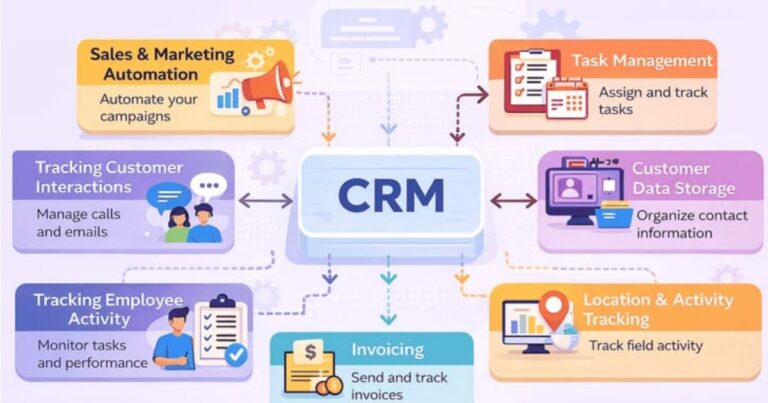
At its core, CRM software allows you to:
- Store customer contact information
- Track sales pipelines
- Monitor communication history
- Automate repetitive tasks
- Analyze customer behavior
Why Small Businesses Need CRM
Many small business owners rely on spreadsheets, emails, or even memory to manage customer relationships. While this may work in the early stages, it quickly becomes inefficient as the business grows.
CRM software helps small businesses:
- Stay organized
- Save time
- Increase sales
- Improve customer satisfaction
- Make data-driven decisions
Benefits of CRM Software for Small Businesses
Improved Customer Relationships
CRM systems provide a complete view of each customer, including their preferences, purchase history, and communication records. This allows businesses to personalize interactions and build stronger relationships.
Increased Sales and Revenue
By tracking leads and managing the sales pipeline, CRM software helps businesses identify opportunities, follow up effectively, and close more deals.
Better Time Management
Automation features reduce manual work, allowing business owners and teams to focus on high-value tasks.
Enhanced Collaboration
A centralized CRM system ensures that everyone on the team has access to the same information, improving communication and collaboration.
Data-Driven Insights
CRM platforms provide analytics and reports that help businesses understand performance, identify trends, and make informed decisions.
Key Features to Look for in CRM Software
Contact Management
A good CRM should allow you to store and organize customer information efficiently.
Sales Pipeline Management
This feature helps you track deals from initial contact to final sale.
Automation Tools
Automation can handle tasks such as sending emails, scheduling follow-ups, and updating records.
Reporting and Analytics
Insightful reports help you measure performance and optimize strategies.
Integration Capabilities
The CRM should integrate with tools you already use, such as email platforms, accounting software, and marketing tools.
Mobile Access
Mobile-friendly CRM software ensures you can manage your business on the go.
Types of CRM Software
Operational CRM
Focuses on automating business processes such as sales, marketing, and customer service.
Analytical CRM
Provides insights through data analysis and reporting.
Collaborative CRM
Enhances communication and collaboration across teams.
Best CRM Software for Small Business
All-in-One CRM Solutions
These platforms offer a wide range of features, making them ideal for businesses looking for a comprehensive solution.
Features to Expect
- Contact and lead management
- Email marketing tools
- Sales automation
- Customer support features
Sales-Focused CRM Tools
Designed primarily for sales teams, these tools focus on lead tracking and pipeline management.
Best Use Cases
- Businesses with active sales teams
- Companies focused on closing deals quickly
Marketing-Oriented CRM Platforms
These CRMs emphasize marketing automation and customer engagement.
Ideal For
- Businesses running campaigns
- Companies focused on lead generation
Budget-Friendly CRM Options
Small businesses often have limited budgets, so affordable CRM solutions are essential.
What to Look For
- Free plans or trials
- Scalable pricing
- Essential features without unnecessary complexity
How to Choose the Right CRM for Your Business
Identify Your Needs
Start by understanding your business requirements. Consider factors such as:
- Team size
- Sales process complexity
- Budget
- Growth plans
Evaluate Features
Choose a CRM that offers the features you actually need, not just the most popular ones.
Consider Ease of Use
A complicated CRM can reduce productivity. Look for intuitive interfaces and easy onboarding.
Check Integration Options
Ensure the CRM works well with your existing tools.
Read Reviews and Testimonials
User feedback can provide valuable insights into the strengths and weaknesses of a CRM platform.
CRM Implementation Guide
Step 1: Define Your Goals
Determine what you want to achieve with your CRM system.
Step 2: Choose the Right Platform
Select a CRM that aligns with your goals and budget.
Step 3: Import Your Data
Transfer existing customer data into the CRM system.
Step 4: Train Your Team
Ensure all team members understand how to use the CRM effectively.
Step 5: Customize the System
Tailor the CRM to match your workflows and processes.
Step 6: Monitor and Optimize
Regularly review performance and make improvements as needed.
Common Challenges and How to Overcome Them
Resistance to Change
Employees may be hesitant to adopt new tools. Provide proper training and highlight the benefits.
Data Migration Issues
Ensure data is clean and organized before importing it into the CRM.
Overcomplicating the System
Avoid adding unnecessary features that can overwhelm users.
Lack of Strategy
Implementing a CRM without a clear plan can lead to poor results.
Tips to Maximize CRM ROI
Keep Data Clean
Regularly update and remove outdated information.
Use Automation Wisely
Automate repetitive tasks but maintain a personal touch.
Track Key Metrics
Monitor KPIs such as conversion rates, customer retention, and sales growth.
Continuously Train Your Team
Provide ongoing training to ensure optimal use of the CRM system.
Future Trends in CRM Software
Artificial Intelligence Integration
AI-powered CRMs can provide predictive insights and automate complex tasks.
Mobile-First Solutions
More CRM platforms are focusing on mobile usability.
Personalization at Scale
Advanced tools allow businesses to deliver personalized experiences to a large audience.
Integration with Other Technologies
CRMs are increasingly integrating with tools like chatbots, social media platforms, and e-commerce systems.
Conclusion
CRM software is no longer a luxury for small businesses—it is a necessity. With the right CRM system, businesses can streamline operations, improve customer relationships, and drive growth.
Choosing the best CRM software depends on your specific needs, budget, and goals. By understanding the features, benefits, and implementation strategies outlined in this guide, you can make an informed decision and set your business up for long-term success.
Investing in CRM software is ultimately an investment in your customers—and that is the key to sustainable business growth.